
|
|









Running out of disk space on
your machine? Opening a program taking so long you wanna shoot
yourself in the face? The major problem is hard drive space, not
many typical computer users realize that the more free disk space
you have on your machine, the quicker and more reliable it will
be able to do what you want it to.
You Should preform these tasks at least monthly:
Mp3 Files - You want to listen to music, and you
want it for free, so what is the solution? Mp3s, but too many of
these can destroy free space, so what I suggest is going through
your list of songs, and finding those songs that you can really
do without and delete them.
Excess Programs - I'm sure there are plenty of
programs and games you can do without. On the desktop, simply go
to My Computer, then to the Control Panel, then to Add/Remove
Programs. There it will show you a list of programs, simply
choose one that you don't want anymore and click Uninstall. Rinse
and Repeat till you only have the stuff you need on that list.
Other Files - Now, there are probably some files
that you don't need, like picture files, word documents, etc. Go
through these and delete the ones you don't need anymore.
Internet Files - You probably did not realize
that AOL and Internet Explorer related files take up a ton of
room, and can usually take up several hundred megs if you have
never cleared them out before. Now, this scenario is different.
There is a program you can download that will save you the
trouble of having to find the files and delete them. It is called
WinJanitor, and it is a great tool for freeing up space on your
computer. You can get it Here .
Now I will cover how to use
it, this is important for you to pay attention, because you might
mess up something important. Now, after you download and install
it, run the program. Make the setup look like this:
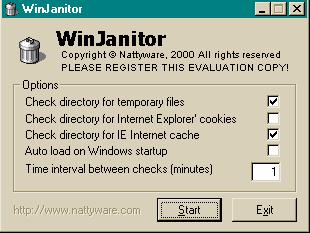
Now, hit the start button and and wait the minute. After that
time period, you can go ahead and hit exit. Wasn't that fun? You
just cleared up your internet files.
Many people also don't know that Windows has a cleanup program of
it's own built into your machine. Go to My Computer, right click
on C: and go to Properties. Now, you will see a button that says
Disk Cleanup. Click on it. Now, make the check boxes look like
this:
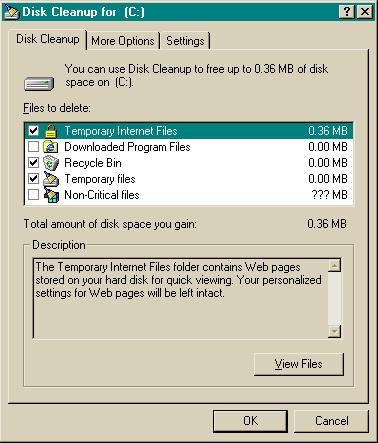
After you do that, hit Ok and
yes to delete the files. Now that cleared up some space too.
With this information, you can have a happy computer, and a not
quite as angry you.